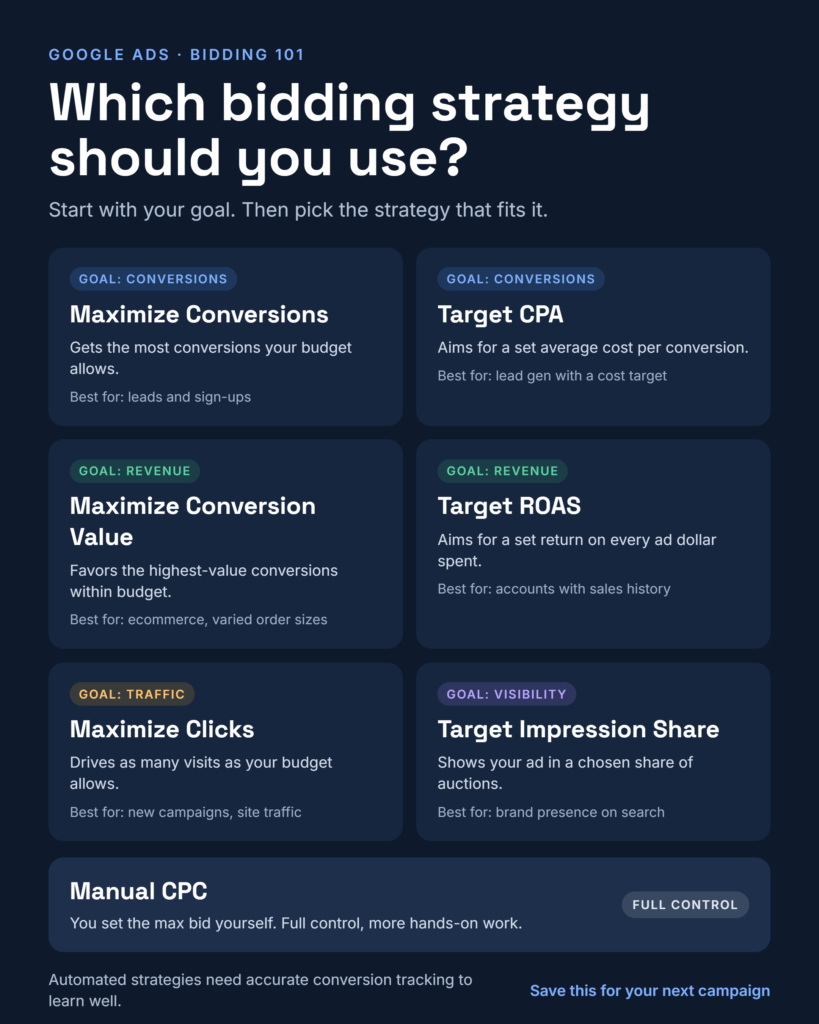
Your bidding strategy decides what Google optimizes for
Budget sets how much you can spend. Your bidding strategy sets what that money is trying to buy: clicks, conversions, revenue or visibility.
Pick a strategy that matches your real goal and Google’s machine learning works in your favour. Pick the wrong one and it will do exactly what you asked for, such as cheap clicks that never convert or a cost target so tight that volume collapses.
This guide walks through the main Google Ads bidding options, grouped by the goal each one serves. It also covers how to choose between them and what has changed recently, so you are not relying on outdated advice.
Start here: manual, automated and Smart Bidding
Every Google Ads bidding option falls into one of three groups, and the choice between them is the first decision you make.Your bidding strategy decides what Google optimizes for
| Group | Strategies | You are paying for |
|---|---|---|
| Manual | Manual CPC | Clicks, at bids you set yourself |
| Automated | Maximize Clicks, Target Impression Share | Traffic or visibility, with bids set by Google |
| Smart Bidding | Maximize Conversions, Target CPA, Maximize Conversion Value, Target ROAS | Conversions or conversion value, optimized in every auction |
Smart Bidding is the group that gets most of the attention, for good reason. According to Google’s Smart Bidding documentation, it sets a separate bid for each auction of each query. It raises or lowers that bid based on how likely the query is to perform, using signals such as device, location, time of day, remarketing list membership and the search query itself.
No human can adjust bids at that level of detail. That is why conversion-based strategies usually outperform manual bidding, provided the data feeding them is accurate.
Goal: more leads or sales
Two strategies chase conversions. The difference is whether you give Google a cost target.
Maximize Conversions
Google spends your full budget and tries to get as many conversions as possible from it. There is no cost target, so your cost per conversion can swing as budgets and competition change.
- Best for: new campaigns, lead generation, and cases where volume matters more than a fixed cost.
- Watch out for: an unpredictable cost per conversion. If you have a hard cost ceiling, this is the wrong tool.
Target CPA
You set the average cost you want to pay per conversion, and Google bids to hold close to it. Volume becomes secondary to hitting the target, as PPC Land’s coverage of Google’s June 2026 update puts it.
- Best for: lead generation with a known allowable cost per lead, and campaigns with steady conversion history.
- Watch out for: targets set too low. A target below what the market allows starves the campaign of volume. Google suggests judging results over a longer window with around 30 conversions.
Target CPA used to appear in the interface as “Maximize conversions with a Target CPA”. From June 2026 Google shows it as its own strategy. The bidding behavior did not change, according to Google’s Smart Bidding documentation.
Goal: more revenue or profit
If your conversions are not equal in value, counting them equally leaves money on the table. Value-based strategies bid harder for the customers likely to spend more.
Maximize Conversion Value
Google spends your budget to get the highest total conversion value it can. You can add a target ROAS to it or leave it open, as Google’s bid strategy overview describes.
- Best for: ecommerce with a wide range of order sizes, and lead gen where you can assign different values to different lead types.
- Watch out for: weak value data. If every conversion carries the same value, this behaves like Maximize Conversions.
Target ROAS
You set the return you want on ad spend, and Google bids to hold close to it. A 400% target means $4 of conversion value for every $1 spent. It may skip auctions it expects to return less, according to PPC Land, which also notes it needs meaningful, varied conversion values.
- Best for: established ecommerce accounts with solid sales history and clear margin targets.
- Watch out for: a target set above what the account has achieved. Google suggests evaluating over a longer period with around 50 conversions, per the Smart Bidding documentation.
One practical point for retailers: ROAS is a revenue ratio. If your margins differ a lot by product, pass profit-based values into conversion tracking so the strategy optimizes for what you actually keep.
Goal: more traffic
Traffic strategies optimize for clicks, not outcomes. They suit specific situations, and they are easy to misuse.
Maximize Clicks
Google sets bids to get as many clicks as possible within your budget. It does not know or care which clicks convert. In practice it is worth setting a maximum CPC limit, so a few expensive auctions cannot eat the budget.
- Best for: brand-new campaigns collecting early data, content promotion, and awareness pushes where visits are the goal.
- Watch out for: cheap, low-intent clicks. Once you have conversion data, move to a conversion-based strategy.
Manual CPC
You set the maximum bid yourself, at ad group or keyword level. Nothing adjusts it for you.
- Best for: very small budgets, brand-new accounts with no conversion data, and tests where you want full control of what each keyword costs.
- Watch out for: the workload. Manual bids cannot react to auction-by-auction signals the way Smart Bidding does.
A note on Enhanced CPC, the old halfway option between manual and automated. Google retired it for Search and Display campaigns in March 2025. Campaigns that were not moved to another strategy effectively run on Manual CPC now, so check older campaigns for this.
Goal: more visibility
When being seen matters more than being clicked, you bid for placement or impressions.
Target Impression Share
Google sets bids to show your ad at the absolute top of the results page, at the top, or anywhere on the page, depending on what you choose. It is available on the Search Network only, as Google’s overview of automated bidding explains.
- Best for: protecting brand terms from competitors, and launches where being first on the page is the point.
- Watch out for: cost. Chasing the top position in competitive auctions is expensive, so set a maximum CPC limit and watch spend closely.
Target CPM
Target CPM aims to increase impressions, and Google lists it among its automated strategies for awareness-style goals. It fits upper-funnel campaigns where reach counts. Judge it by reach and brand lift, not by conversions.
Visibility strategies are legitimate, but they should be a deliberate choice. If sales are the real goal, a conversion-based strategy will almost always serve you better.
How to choose: match the strategy to where you are
The right strategy depends on two things: what you want to buy and how much reliable conversion data you have. Use this as a starting point, not a rule.
| Your situation | Start with | Move on when |
|---|---|---|
| New account, no conversion tracking yet | Maximize Clicks with a CPC limit, or Manual CPC | Conversion tracking is live and recording accurately |
| Tracking live, little conversion history | Maximize Conversions | Conversions are steady and you know your cost target |
| Lead gen with a known cost per lead | Target CPA | Costs or lead quality drift from your targets |
| Ecommerce with varied order values | Maximize Conversion Value | Sales history is solid and you know your return target |
| Established ecommerce with a margin goal | Target ROAS | Targets stop matching your margins |
| Brand defence or a launch | Target Impression Share | Visibility is secured, or cost climbs too high |
The common pattern is to start without a target, let the system learn, then add a target once you know what a good result looks like. Setting an aggressive target on day one is one of the most common ways to stall a campaign.
Four mistakes that quietly cost money
- Feeding the algorithm bad data. Google requires conversion tracking to be enabled before you create a Smart Bidding strategy. Duplicate, missing or mis-valued conversions teach the system the wrong lesson, and it will optimize for it confidently.
- Judging too early. Google recommends evaluating over a longer period, and advises giving changes one to two conversion cycles. Switching strategies every few days resets learning and hides what actually worked.
- Starving a targeted campaign of budget. A tight target on a small budget limits volume. Google advises keeping daily budgets comfortably above average daily spend.
- Setting targets once and forgetting them. Targets should follow your margins, seasonality and lead quality, not the number you picked at launch.
What changed in 2026
Two updates matter for anyone running target-based bidding.
June 2026: new names, same behavior. “Maximize conversions with a Target CPA” is now labelled “Target CPA”, and “Maximize conversion value with a Target ROAS” is now “Target ROAS”. Google says the bidding behavior is unchanged and no account action is needed.
17 August 2026: targets are enforced more strictly. According to Google’s help page on target-based bid strategies, campaigns that are limited by budget now perform more consistently toward the target you set, even when you change the budget. Before, a campaign that was beating its target could see performance shift after a budget change. The change covers Target CPA and Target ROAS on Search, Shopping, Performance Max, Demand Gen, Travel, Display and Hotel campaigns. App campaigns and Video reach and view campaigns keep their previous behavior.
Google does not adjust your targets or budgets for you. If you have not reviewed them since the update, do it now. Keep the target if it still reflects your goals, set a new one based on recent results, or switch to Maximize Conversions or Maximize Conversion Value if you want volume over a fixed target.
The takeaway
There is no best bidding strategy, only the best one for your goal and your data. Start by naming what you want to buy: conversions, revenue, traffic or visibility. Make sure your conversion tracking is trustworthy. Then choose the strategy built for that goal, and give it enough time to prove itself before you change it.
Which bidding strategy has worked best for you, and which one disappointed? Share it in the comments.
#GoogleAds #PPC #DigitalMarketing #PerformanceMarketing